Showing posts with label FamilySearch. Show all posts

Monday, June 19, 2017

LDS Features


One of the key features for various genealogical software is the ability to record all types of events connected with individuals throughout their lives. For many there are Christenings or Baptisms, Confirmations, and other events which are important factors connected with a specific religious affiliations.

Ancestral Quest has the ability to add all of the various events including the ones connected with temples in the Latter-day Saint faith.

To activate these features within the program, one needs to go to Tools, scroll down and click on Preferences as follows:


In the red box, check these items shown in the red box above: 1) Use LDS Data 2) Show on Reports 3) Ordinance Codes on Child List and 4) Connect with FamilySearch. Now click OK , this is the first step. The next step will turn on the Temple Icons. 

From the main screen click on FamilySearch, scroll down and click on Ordinance Reservation and Tracking System, if you have no logged in, it will prompt you to do that, once you have successfully entered your login information you'll be brought another box with 5 buttons, one of them will be "Show Temple Icons".


Click on the "Show Temple Icons" and this will close and your temple icons will be there.

Once you've followed the above steps you will have turned on the LDS features within this program. 
You will note there are other buttons there to assist you these features.

Enjoy this and all the features in Ancestral Quest 15!


Remember Ancestral Quest is fully FamilySearch Certified!


Comments and questions are always welcome!


Happy Ancestraling...Claire ;)


AQ Cues & Clues Blog:http://ancquest.blogspot.com/

(c) 1994-2017 Incline Software, All Rights Reserved
 gfindlay@ancquest.com


Thursday, March 9, 2017

TreeTips


As family history/ancestral researchers, it is always a good thing to get extra help in locating one's ancestors. TreeTips, does just this, it helps you research and locate records and family trees from the information in your own data files.

In partnership with MyHeritage, FamilySearch and Findmypast, Ancestral Quest provides TreeTips in your own datafile. As you enter in the information you know about an ancestor, AQ will use the combined hints of these three web-based companies to search over 12 billion records for additional information to help grow your tree or to provide you with missing sources from known but not proven information.

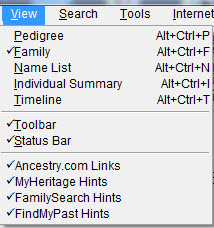
To make sure these are activated, go to the View in the AQ program menu and make sure the hints are all checked.


The above action will put additional Icons showing there are hints on the individuals in your tree. It looks like this:


Note that for this individual, there are hints from Findmypast, FamilySearch and MyHeritage. Hovering on each Icon shows you how many hints there are for you and clicking the Icon takes you right to the hints.


This is the actual 1920 US Census for Joseph Brisson and his family. I can easily attach it to my records as a source if I need to. Additionally, I'll be able to confirm or deny this is a good hint. 

Each Icon does the same, it brings you to records and/or trees from the above sites. This is one of the new features in Ancestral Quest 15, this author has found some new discoveries using this feature and is looking forward to possibly breaking through some brick walls and also adding some additional missing sources using TreeTips.

Take advantage of all the new features in Ancestral Quest 15 today!


Remember Ancestral Quest is fully FamilySearch Certified!


Comments and questions are always welcome!


Happy Ancestraling...Claire ;)


AQ Cues & Clues Blog:http://ancquest.blogspot.com/

(c) 1994-2017 Incline Software, All Rights Reserved
 gfindlay@ancquest.com


Friday, October 16, 2015

Turning On FamilySearch-Family Tree Connection


When you first download Ancestral Quest the connection to FamilySearch Family Tree is not turned on. To turn them on follow these steps:

Go to Tools and then Preferences:


On the "General" tab that appears, look to the upper-right area of the window, the following options should have a check mark:

Connect with FamilySearch


Place a check mark in the box and click OK to save the changes. Now the ability to link and sync with Family Search has been enabled. 

When viewing your database you will see a tree at the end of the name which is clickable into the FamilySearch Family Tree database.  You will have to have a FamilySearch account, it is not necessary to be a member of the LDS church to have an account and there is no cost.


Once your individual is linked, the tree changes to a blue tree instead of a clear tree.

Using FamilySearch.org to aid your research can help with locating new family members. This feature can aid you in growing your family tree.


Remember Ancestral Quest is fully FamilySearch Certified!


Comments and questions are always welcome!


Happy Ancestraling...Claire ;)

AQ Cues & Clues Blog:http://ancquest.blogspot.com/

(c) 1994-2015 Incline Software, All Rights Reserved
 gfindlay@ancquest.com


Thursday, September 12, 2013

PAF to AQ: No GEDCOM Necessary


As many genealogists and family historians know, PAF has been a mainstay since June, 1999 and for some, still is, in spite of the fact that it hasn't been supported or improved in a very long time.

On July 15th, 2013, FamilySearch.org displayed the following announcement for all PAF users:


The history of PAF and AQ goes back to 1997 when PAF 3 was introduced with a different database structure. This prompted AQ 3.0 to have the ability to work with that new database structure. In 1999, PAF 4 and PAF 5 were created from the code provided to FamilySearch by Incline Software, in fact, PAF 4 was nearly identical to AQ 3.0 except for the different name and a few other minor variations. PAF 5 was last released in 2002, yet AQ has continued to improve and provide many new features that have made it a winner of multiple awards over the years.

Switching over to AQ is as simple as opening up your PAF database from within Ancestral Quest, there is no GEDCOM files to create and import, nothing will be lost, and you will feel like you are working in PAF with a long list of improved features!

Take advantage now of this easy switch over and the limited time offer for PAF users today!

Happy Ancestraling...

Claire ;)
AQ Cues & Clues

Blog: https://www.facebook.com/AncQuest
Facebook: https://www.facebook.com/AncQuest
Twitter: www.twitter.com/ancquest
YouTube: http://www.youtube.com/inclinesoftware

(c) 1994-2013 Incline Software, All Rights Reserved
     gfindlay@ancquest.com