Friday, March 7, 2014

AQ: PAF to AQ - A Simple Task


     Are you a PAF User switching to Ancestral Quest and confused on how this is done?

     Generally individuals who are switching from PAF to AQ have been using PAF for years. It is because of the special relationship between these two software programs that switching from one to the other is rather simple.

     The windows version of PAF was created from the code provided to FamilySearch by Incline Software in 1999. PAF 4 was nearly identical to Ancestral Quest Version 3, except for the different name and a few other minor changes. PAF 5 went through some additional changes before its final release in 2002.

     Over the years, Incline Software has continued to improve upon the software, the resulting effects are that PAF users will feel right at home and be able to continue to use features they have come to expect along with new features that were created since 1999.

     When choosing to switch to Ancestral Quest, one has the option of trying out the free AQ Basic version or purchasing the full version of AQ 14, either way one will be able to view those PAF files very easily.

     Download the product you have chosen, AQ Basics or AQ 14 and install it to your computer. Once insttalled you will see an AQ Icon on your desktop like this:


Double click this icon to open up the program which will be just an empty database at this point.


     It is at this point that you look for your .paf file and double click, if you don't remember where your PAF file is, you can click on the "Search" button and the program will search for your PAF files:


     Click on the PAF file and then click on Open and your database will open up inside of Ancestral Quest!


     Note that one is in Ancestral Quest as shown in the top left hand corner and you have opened a PAF file which is evident in the lower right hand corner. At this point you can choose to continue using your database as a PAF file or convert it to an AQ file. Converting to an AQ file is covered in one of the two videos.

     We've created two videos to help with PAF files, enjoy!

Remember Ancestral Quest is fully FamilySearch Certified!


Comments and questions are always welcome!

Happy Ancestraling...
Claire ;)
AQ Cues & Clues
Blog: https://www.facebook.com/AncQuest
Facebook: https://www.facebook.com/AncQuest
Twitter: http://www.twitter.com/ancquest

YouTube: http://www.youtube.com/inclinesoftware

(c) 1994-2014 Incline Software, All Rights Reserved
 gfindlay@ancquest.com


Thursday, February 20, 2014

AQ: Noticing Updates...


      Most of us are creatures of habit and often use to doing things a certain way to the point that, when a new way to do something is introduced, often, it is ignored as long as possible until there is no choice but to adopt that new way into a new habit.

     There are always exceptions to this, when each of the new iPhones were released, many stood outside of stores waiting to be the first to own one as well as many other electronic products that have been introduced over the years.

     Regardless of how new a device or program is, updates are a necessary part of making sure it is always working properly and running correctly according to its design.

     Ancestral Quest is no different and so the programmers have created a way to alert you when updates are available for your program, however, many don't notice the alert and close it out only to call in because the program may not work they way it should.

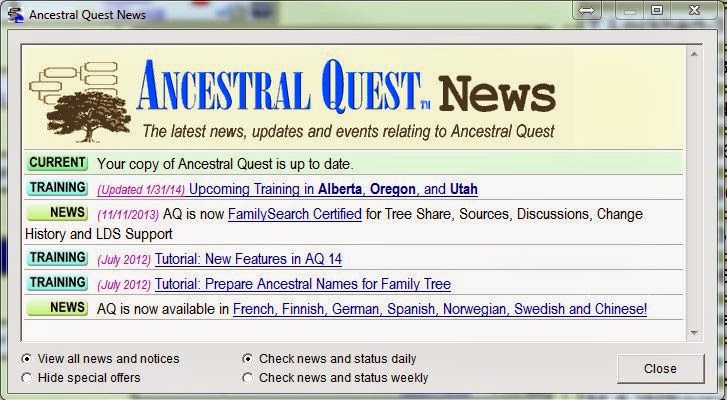
     When you first open Ancestral Quest, this is the screen you need to notice:


      Notice the first line in this box is CURRENT and is states my copy of Ancestral Quest is up to date. If your copy is not up to date it will tell you and provide a link to update. As there are many changes going on it is important to notice this when the program opens.

      If you missed this notice, you can also check by going to "Internet" and clicking on "Check for Latest AQ Release" as shown below:


     This click will take you to our website where it will check to make sure you have the latest update. If your program is updated it will tell you and if it is not, there will be a link to update it to the latest version.

     Ancestral Quest recommends you check on a regular basis to make sure you have the latest build by either noticing the notice or checking yourself as shown above. Staying updated allows your program to be the best it can be and continue to manage your genealogical database to your satisfaction.

     AQ has just released a tutorial to help with this process following it all the way to being installed on your computer, check it out here: http://ancquest.com/updatetutorial/index.htm!

Remember Ancestral Quest is fully FamilySearch Certified!


Comments and questions are always welcome!

Happy Ancestraling...
Claire ;)
AQ Cues & Clues
Blog: https://www.facebook.com/AncQuest
Facebook: https://www.facebook.com/AncQuest
Twitter: http://www.twitter.com/ancquest

YouTube: http://www.youtube.com/inclinesoftware

(c) 1994-2014 Incline Software, All Rights Reserved
 gfindlay@ancquest.com


Tuesday, February 11, 2014

AQ Users: Windows XP Being Retired...


Seems that Windows XP was a welcome relief from its predecessor Windows 2000 and Windows ME to the point that there are many individuals who are still using this as their operating system on the computers.

Windows XP was released on August 24, 2001 and is considered the second most popular Windows version from statistics based on an installed user base. For those who may not have known, the XP was taken from the work 'Experience' and provided a better user experience than earlier Window versions up to that point in time. Back on April 10, 2012, Microsoft reaffirmed that extended support of Windows XP and Office 2003 would end on April 8, 2014. (1)

At the time of this announcement, that date, April 8, 2014 seemed a long way off and yet, here we are in February, 2014 and it is only about 6 weeks away from now! According to a recent article from Computer World: 

     Microsoft will provide the final public patches for known vulnerabilities in XP on April 8; after that, customers will face an increasingly dangerous future, as most security experts, including those working for Microsoft, expect cyber criminals to continue to dig up new bugs, called "zero days", and unleash exploits on people who still rely on the retired Operating System."

According to this same article, Microsoft suggest that successful attacks against XP could go as high as 66 % after April.(1) This technical support also includes Microsoft Security Essentials in connection with Windows XP, it really is time to seriously consider upgrading to a newer operating system in order to continue to provide the best possible protection and user experience for yourself and your family. This is the best way to prevent any possibility of allowing your own computers to become vulnerable to security risks and virus attacks.

So what the options?


Looking at the Windows products page, one can upgrade to Windows Vista, Windows 7, or Windows 8.1, whichever one you choose, be sure to do this sooner rather than later so that you will be able to continue to keep your computer with the most up to date security and virus protections possible.

Ancestral Quest works with all of these operating systems and wants you to have the best possible experience using our program and preserving your family data as best as possible.

1) http://en.wikipedia.org/wiki/Windows_XP

Remember Ancestral Quest is fully FamilySearch Certified!


Comments and questions are always welcome!

Happy Ancestraling...
Claire ;)
AQ Cues & Clues
Blog: https://www.facebook.com/AncQuest
Facebook: https://www.facebook.com/AncQuest
Twitter: http://www.twitter.com/ancquest

YouTube: http://www.youtube.com/inclinesoftware

(c) 1994-2014 Incline Software, All Rights Reserved
 gfindlay@ancquest.com


Wednesday, January 8, 2014

AQ: Great Awards and Reviews!


Whenever one gets great Awards it is definitely time to celebrate and continue on to provide the best possible genealogical software product available today!

For the 3rd year in a row, GenSoftReviews has awarded Ancestral Quest the winner as their "Top Rated Genealogical Software"!


There are some wonderful comments about Ancestral Quest and anyone can add their own comments as well and we definitely appreciate all our users to take a moment and share your thoughts on Ancestral Quest, I've added the link to the reviews here.

Another great write up was also done just at the end of the year by Bonnie Raymond from examiner.com. Her review was extensive and very well written. She took it step by step from installation to using the program and carefully went through many of the features of Ancestral Quest. A quote from her review says:

"I have used several different genealogy programs in recent years and they all left me wishing for something easier to use that would allow me to enter and view my data without having to read a hefty manual first. Ancestral Quest is the answer to my prayers. If I need help, I can view their tutorials or access the help files but the program is simple and intuitive to use.

Her article is entitled: "Ancestral Quest Software: Discover and share your family history" and is available from their website.


It is always fun to share the wonderful news of how other individuals enjoy and use Ancestral Quest. Be sure to share your comments as others ask what you may use to handle your ancestor database! 

Remember Ancestral Quest is fully FamilySearch Certified!


Comments and questions are always welcome!

Happy Ancestraling...
Claire ;)
AQ Cues & Clues
Blog: https://www.facebook.com/AncQuest
Facebook: https://www.facebook.com/AncQuest
Twitter: http://www.twitter.com/ancquest

YouTube: http://www.youtube.com/inclinesoftware

(c) 1994-2014 Incline Software, All Rights Reserved

     gfindlay@ancquest.com


Wednesday, December 18, 2013

AQ: To Date AQ available in 10 Languages!


     Having a program in your own language can make all the difference in the world to a user. Their ability to take advantage of all the bells and whistles of a program is enhanced and improved 100%.

     While this is the ideal for all, it is also a daunting task when you consider how many different languages there are in the whole world. Individuals who write programs for different software have their work cut our for them in this regard.

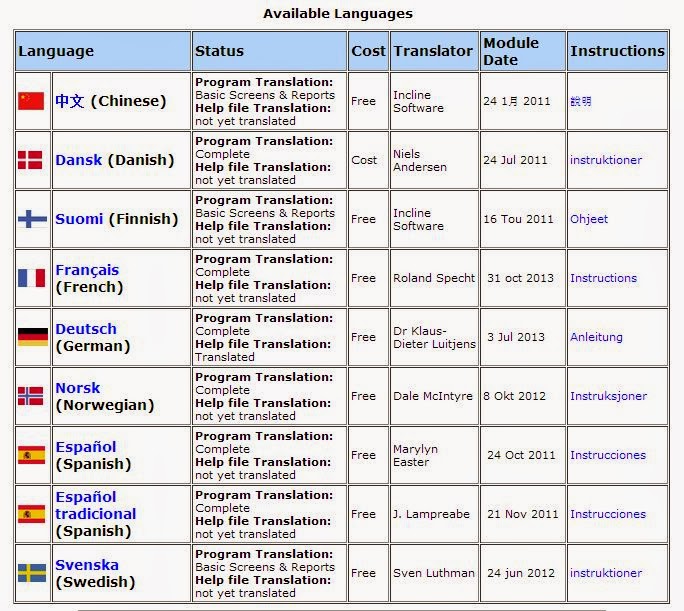
     Ancestral Quest has reached out to its community of users over these last few years and various individuals have come forward and assisted in the massive undertaking of making AQ available in other languages. The chart below shows the progress that has been made and these 9 additional languages available besides English:


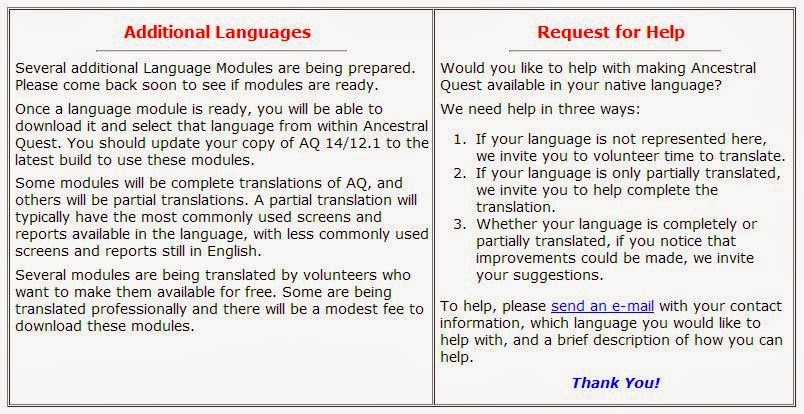
     Most of the above languages are available for free and will be helpful to anyone needing them, note that some of the 'Help Files' are not yet completed while the program has been completed. As more languages are added they will be added to this chart. AQ is always looking for people to help as there are many many languages. The following is also on the same page if anyone is able to help grow this list as follows:


     If per chance you are able to help with this initiative, please send us an email with the subject line of "Willing to Translate" and we will work with you to achieve another language translation!

Remember comments and questions are always welcome!

Happy Ancestraling...
Claire ;)
AQ Cues & Clues
Blog: https://www.facebook.com/AncQuest
Facebook: https://www.facebook.com/AncQuest
Twitter: http://www.twitter.com/ancquest

YouTube: http://www.youtube.com/inclinesoftware

(c) 1994-2013 Incline Software, All Rights Reserved

     gfindlay@ancquest.com

Friday, December 13, 2013

Updates: Hardware and Software


The cycle of life requires us to keep many things updated along with ourselves.

Seems like every day some application on my smart phone is needing to to updated and so it makes perfect sense that software and hardware would also need to be updated. Notices that something is outdated can sometimes be accomplished with just a few clicks, while others require one to download, run and re-start their computer, one just never knows.

Additionally, individuals find it is time to replace an old computer with a much improved one. So what happens to all the programs and applications on your old computer? They actually will need to be reinstalled and/or transferred. While there are programs to help this out, it does take a lot of time. Also some programs many not work on the new computer so one has to sure to have a back up plan when that happens.

How does Ancestral Quest handle these things?

There is a "Downloads" page to help you with this when the need is there:


Note that you can re-download whatever version you along with the "Adam" sample database and a "Scrapbook Sample Database". 

Know that you'll have to be careful with different versions as only certain ones will work on the new computers. When you click on the "Re-download your Ancestral Quest installer", it takes you to where you can choose the version you have, be sure to read the "System Requirements" so that you have the version that will work with your new computer.

If it turns out that your current version will not work with your new computer, you will have to upgrade, but this will happen to other programs on your older computer as each program has its unique requirements and was built for a specific operating system.

Know that AQ is always striving to stay up-to-date with its software and operating systems. Here is the link for the downloads page and the upgrade page if it turns out you need to update. 

Remember comments and questions are always welcome!

Happy Ancestraling...
Claire ;)
AQ Cues & Clues
Blog: https://www.facebook.com/AncQuest
Facebook: https://www.facebook.com/AncQuest
Twitter: http://www.twitter.com/ancquest

YouTube: http://www.youtube.com/inclinesoftware

(c) 1994-2013 Incline Software, All Rights Reserved

     gfindlay@ancquest.com

Wednesday, December 4, 2013

AQ: Using the Search Functions...


     Locating family members, documentation and connections are some of the main activities genealogists and family historians spend a good majority of their time to conduct research.

     There are many ways to conduct research today, online, a library, an achive, and of course through family interviews. Today we will review the help aids with online research provided within Ancestral Quest.

     One of the prompts when installing Ancestral Quest is the ability to View Ancestry.com Links, this happens when you put your database file into "pedigree view" and looks like this:


     Notice the links at the end of each box, when you click either one it will take you to Ancestry.com for that person where you are able to locate additional family information. If you do not have a subscription to Ancestry.com, it will alllow you to view some of the information but not all. If these links are not visible it is because they are not 'checked' for viewing. Under view menu you will see in the dropdown menu where it needs to be checked like this:


     With the checkmark next to 'Ancestry.com Links' you will be able to click straight through for the highlighted individual.

Additional places to search in a similar way are found under 'Internet' dropdown menu which looks like this:


     Notice that this is another way to link to Ancestry.com but also FamilySearch, World Vital Records and 'Favorite Sites'.

     There are two 'Favorite Sites' links. This first one listed opens up 'My Favorite Web Sites' and comes pre-programmed with some sites you can visit to further your genealogical research. You can select from the list that is there or add your own sites, you can also remove any you deem not necessary. Here is a screen shot of this menu box:


     Notice the various buttons that allow you to work in this screen. The second entry 'Search Favorite Sites', You will be brought to this Search a Web Site screen when you select an Internet site that is searchable.


     If you selected the Internet:Search Favorite Sites menu item, you will need to:

1. Select a site to search
2. Select a person to search on

     If you were brought to this screen another way, the site will have already been selected, so all you need do is select a person to search for (you can change the selected site if you wish).

     The person highlighted on the main view will be the default person to search for. You can change this by pushing the change button.

     When you have the proper site and person selected, press the Perform Internet Search button to activate the search.

     Hopefully learning about these search features within Ancestral Quest will aid you in your own research!

Remember comments and questions are always welcome!

Happy Ancestraling...
Claire ;)
AQ Cues & Clues
Blog: https://www.facebook.com/AncQuest
Facebook: https://www.facebook.com/AncQuest
Twitter: http://www.twitter.com/ancquest

YouTube: http://www.youtube.com/inclinesoftware

(c) 1994-2013 Incline Software, All Rights Reserved

     gfindlay@ancquest.com