Wednesday, May 14, 2014

AQ: Portability and Mobile Applications


We are a very mobile society today and it seems that we want everything right there at our fingertips if at all possible.

In theory this is actually a great idea and many have taken this to reality and created many applications that individuals today can put on their cell phones, smart phones, iPads and Androids, it truly is an amazing time we live in to think that with a few clicks one can locate the nearest place to eat or sleep, even a place to pay the least amount of funds for a gallon of gas or play your favorite game.

Enter genealogists and family historians, there are applications that aid one to access an online tree and most are done very well, however, some may want to access their personal tree through their current software. 


Ancestral Quest has provided this through AQ2Go which allows you to put your program on a flash drive or a portable hard drive. The directions for this are found right on the website here: http://www.ancquest.com/AQ2Go.htm.

Others may not wish to use this portability and are concentrating more on an application, a smart phone or a tablet. Currently the program does run on any tablet that has the full Windows program on it, so the program runs on an Asus ME400 which is a full Windows tablet or any tablet that runs the full Windows program. An article about 10 good Windows tablets is provided on ZDNet.

For other solutions check out some of the following links:

Anroid: http://www.ancquest.com/add-ons.htm#droid_apps

IOS: http://www.ancquest.com/add-ons.htm#iOS_apps

Additionally there are articles on this subject in the FamilySearch Research Wiki:

Android: https://familysearch.org/learn/wiki/en/Accessing_Ancestral_Files_on_Android_Portable_Devices

IOS: https://familysearch.org/learn/wiki/en/Accessing_Ancestral_Files_on_iPad_Portable_Devices

Regardless of which solution you choose, one of these will work for you!

Remember Ancestral Quest is fully FamilySearch Certified!


Comments and questions are always welcome!


Happy Ancestraling...

Claire ;)

AQ Cues & Clues Blog:http://ancquest.blogspot.com/

(c) 1994-2014 Incline Software, All Rights Reserved
 gfindlay@ancquest.com



Thursday, May 1, 2014

AQ: Updating Ordinance Work..


Keeping up with completed temple work can sometimes be overwhelming, however, with just a few clicks using Ancestral Quest, you can update those individuals in your database who have already been linked to FamilySearch Family Tree.

Once you've opened AQ, go to FamilySearch from the top menu bar and click on "Ordinance Reservation and Tracking System" as follows:


This will take you to this screen 


Click on "Update Ordinances" which takes you to this screen


Depending on how many records need to be updated will depend on how long it will take. Once done, your records will be updated.


Take advantage of linking and synching your family file, in this way you'll be able to update more of your database as time goes on.


Remember Ancestral Quest is fully FamilySearch Certified!


Comments and questions are always welcome!

Happy Ancestraling...
Claire ;)
AQ Cues & Clues
Blog: https://www.facebook.com/AncQuest
Facebook: https://www.facebook.com/AncQuest
Twitter: http://www.twitter.com/ancquest

YouTube: http://www.youtube.com/inclinesoftware

(c) 1994-2014 Incline Software, All Rights Reserved
 gfindlay@ancquest.com
Monday, April 28, 2014

AQ: Setting Those Preferences...


Most software programs come with default settings and it is up to the user to adjust those settings to their liking, however, often the individual has no idea they have that kind of control over the performance of their software.

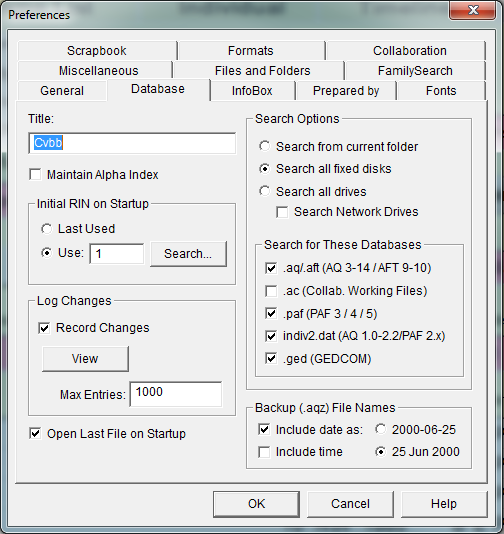
Ancestral Quest manages these adjustments through its Preferences Screen. To get there, one goes to "Tools" and then scrolls down and clicks on "Preferences" which brings up the following Preferences Box.


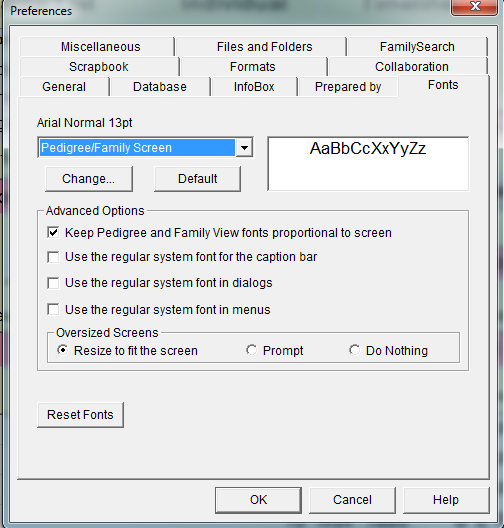
Notice that there are a number of Tabs to help you adjust everything from the date format to the size of the fonts and many other items in between.

On this General tab you can attach RINs to a person or the FamilySearch ID instead. You also can choose different colors and this is where you can check or not check for any of the LDS options.


The database tab allows you to set who is in that first position when you open up your program. You can choose between the same first person or the last person you were working on when you closed down.

When you click on the "Record Changes" under Log Changes, it keeps a list of what you do when you are working on your file. This can be most helpful if you need to re-track your steps. It also allows you to set how you want to label your backup files, and other search options.


This is the format tab that allows you to state how you want dates, places and names show in the database. 


The font tab allows you to change the size of the fonts throughout the various screens that are part of Ancestral Quest using the drop down arrow.

There are a few other tabs one should take time to review to make sure everything is set to your liking and creating a better environment to work in!

Remember Ancestral Quest is fully FamilySearch Certified!


Comments and questions are always welcome!

Happy Ancestraling...
Claire ;)
AQ Cues & Clues
Blog: https://www.facebook.com/AncQuest
Facebook: https://www.facebook.com/AncQuest
Twitter: http://www.twitter.com/ancquest

YouTube: http://www.youtube.com/inclinesoftware

(c) 1994-2014 Incline Software, All Rights Reserved
 gfindlay@ancquest.com


Monday, April 14, 2014

AQ: Drop-Line Charts


Just how are we related to each other?

Often when doing research, one learns of new relationships, cousins, in-laws, etc. This usually is an opportunity to have a colleague in researching family lines and perhaps  exchanging not only family information but also pictures and their family stories.

At some point, curiosity comes into the relationship as to just how two people are actually related.

Ancestral Quest handles these situations very easily through the "Line of Descent Drop-Line chart that can be created once two individuals have been identified as being related.

To begin this process, highlight the first person in the relationship and click on Print Reports and Charts which brings the following menu:


Click on Select and locate the Second Person which opens up the Find Individual/Marriage screen which allows you to either enter their RIN number or if you don't know their number, one clicks on Search for Individual and locate that person and click OK.

Next click on Verify and your results are shown as follows:


Next one has to click on Accept which brings you back to the Reports and Charts, at this point you can click on Print or Preview. In the Preview mode one can view the report. Here is a sampling:


Be sure to take advantage of the Line of Descent whenever and wherever needed, knowing that this chart can easily show two individuals exactly how they are related to each other!

Remember Ancestral Quest is fully FamilySearch Certified!


Comments and questions are always welcome!

Happy Ancestraling...
Claire ;)
AQ Cues & Clues
Blog: https://www.facebook.com/AncQuest
Facebook: https://www.facebook.com/AncQuest
Twitter: http://www.twitter.com/ancquest

YouTube: http://www.youtube.com/inclinesoftware

(c) 1994-2014 Incline Software, All Rights Reserved
 gfindlay@ancquest.com


Friday, April 4, 2014

AQ: Creating Pedigree Charts


When it comes to reports, Ancestral Quest can provide you with a multiplicity of different ones as well as providing custom reports.

All the various reports are accessible from the "Reports and Charts" menu which opens up when you click on the "Printer Icon" or go to File, scroll down and click on "Print Reports and Charts". 


The Pedigree Chart is easy to read and most informative. One can print a decorative one for a wall or a practical one to see where there is missing information. Charts can also be 'cascaded', so that you can print your entire ancestry on a series of charts.

The Fan Chart can be a full circle, half a circle or a quarter of a circle and with color or without color. All these charts can handle up to 13 generations, however, for viewing here, I've only chosen 6 generations:

Using these type of charts is very helpful especially when trying to figure out where the holes are in one's research. These charts do not have to be in color and one can print a half chart or even a quarter chart, it just depends on what is needed.

An extensive break down of these charts is explained in greater detail on Ancestral Quest's website here: http://ancquest.com/aqreprts.htm.

Remember Ancestral Quest is fully FamilySearch Certified!


Comments and questions are always welcome!

Happy Ancestraling...
Claire ;)
AQ Cues & Clues
Blog: https://www.facebook.com/AncQuest
Facebook: https://www.facebook.com/AncQuest
Twitter: http://www.twitter.com/ancquest

YouTube: http://www.youtube.com/inclinesoftware

(c) 1994-2014 Incline Software, All Rights Reserved
 gfindlay@ancquest.com


Friday, March 21, 2014

AQ: Learning about Events on Specific Dates & Building Timelines


When doing research have you even wondered what happened on a specific date but just a different year or time period?

With the help of the Internet this kind of information is relatively easy to obtain. With a few key strokes one can learn about what happened when they were born and what happened on that date over a period of time.

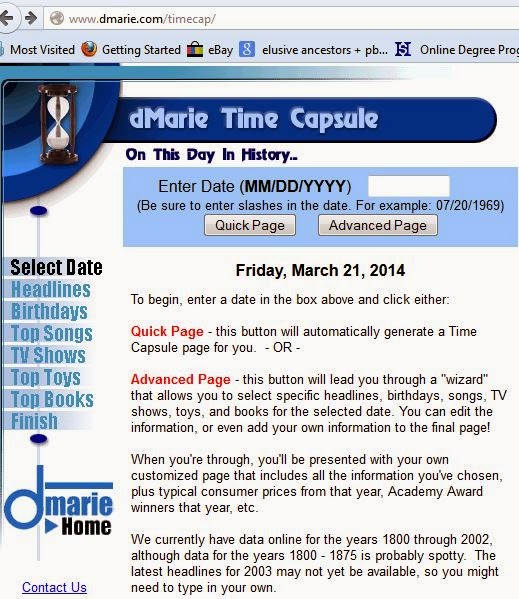
These sites help to create a timeline that includes events going on in the world around you. The first one of interest may be What Happened On My Birth Date? Using dMarie's website, http://www.Dmaire.com/timecap you can easily discover all that was happening on your birthdate.


Note that there are two different customized reports. A "Quick Page" will generate a Time Capsule page for you and the "Advanced Page" allows you to add additional information by topics as well as adding your own headlines. Either way, one can easily use the results to add into one's own timeline.

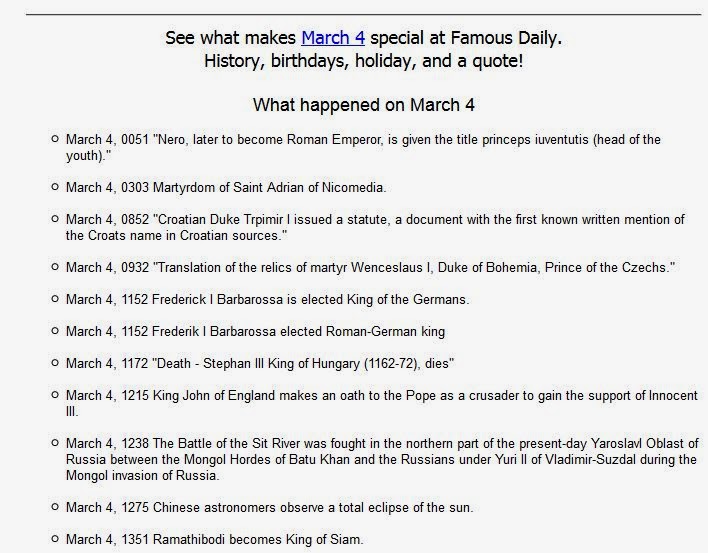
The next site that is also just as interesting is Dates In History at http://www.datesinhistory.com/mar04.php. Choose a date and it will let you know what happened on that date throughout time. Here is a sample:


While one may not wish to go back quite this far in a timeline, it does provide information up to current times!

Either way, each of these sites can help with filling in additional events in an ancestor's timeline. 


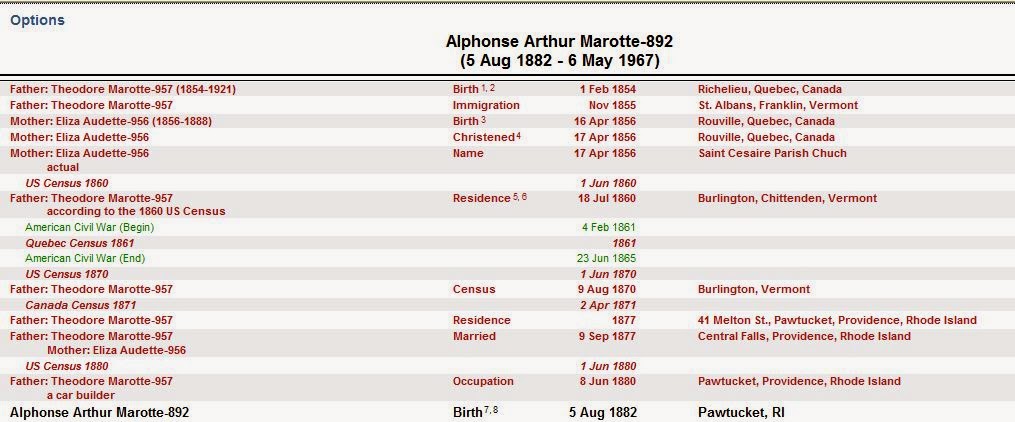
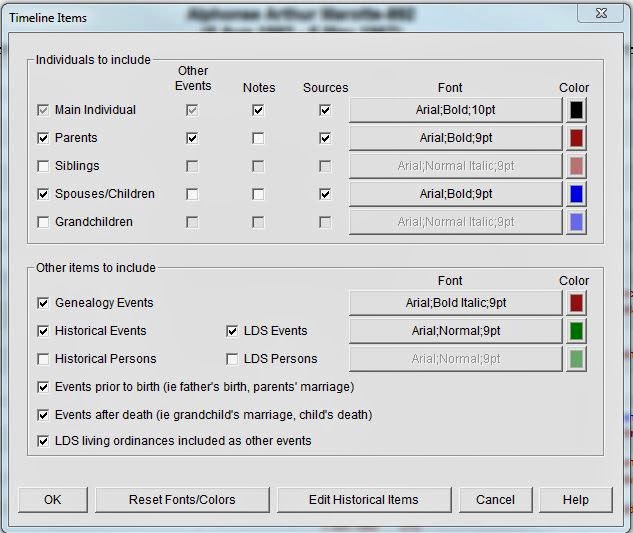
These timelines come with some preset events, however, clicking on Options allows one to add additional items, adjust the colors, etc.


Take advantage of building your timelines for your ancestors as well as yourself!


Remember Ancestral Quest is fully FamilySearch Certified!


Comments and questions are always welcome!

Happy Ancestraling...
Claire ;)
AQ Cues & Clues
Blog: https://www.facebook.com/AncQuest
Facebook: https://www.facebook.com/AncQuest
Twitter: http://www.twitter.com/ancquest

YouTube: http://www.youtube.com/inclinesoftware

(c) 1994-2014 Incline Software, All Rights Reserved
 gfindlay@ancquest.com


Friday, March 14, 2014

AQ: Other Events..Taking Advantage of this Resource!


Throughout one's life are many events that occur besides the birth, marriage and death.

In fact, we are  reminded in a poem entitled "The Dash", written by Linda Ellis of just how important one's time here is to those whose's lives were touched in some way by that person. Usually those individuals are family members, friends, colleagues who had the opportunity to know an individual.

Ancestral Quest has a way to record those additional events, like the first day of school, joining a sports team, winning an award, participating in a play, joining the military, finding a true love, getting that first job and so many more events that are worth remembering and recording.

When you open up and individual's Edit Screen, the area to add these life events is in the lower bottom of the screen as shown below: 


While the shot only shows some of the events, each event shows up in all AQ reports, the individuals summary and their timeline as follows:


The 'other events' are interwoven throughout the timeline very nicely. Be sure to take the time to record those special events for your family members.

Remember Ancestral Quest is fully FamilySearch Certified!


Comments and questions are always welcome!

Happy Ancestraling...
Claire ;)
AQ Cues & Clues
Blog: https://www.facebook.com/AncQuest
Facebook: https://www.facebook.com/AncQuest
Twitter: http://www.twitter.com/ancquest

YouTube: http://www.youtube.com/inclinesoftware

(c) 1994-2014 Incline Software, All Rights Reserved
 gfindlay@ancquest.com