

Computers often need replacing when we least expect it and then it can be a panic to get everything off the one that is going or gone and transferring everything to the new computer.
All this can be difficult and unsettling for many, especially when they finally get home with their data and no programs.
Most places will copy your data but you still have to re-install the program. Family History/Genealogy is one of those types of programs most places will want you to re-install yourself, so how do you do that? Do you have to get a new registration key?
1) You don't need to purchase another key, you can email us and we will send it to you.
2) To re-install the latest version of the program go to our website at http://www.ancquest.com and click on "Resources" and then "Downloads" in the drop down.
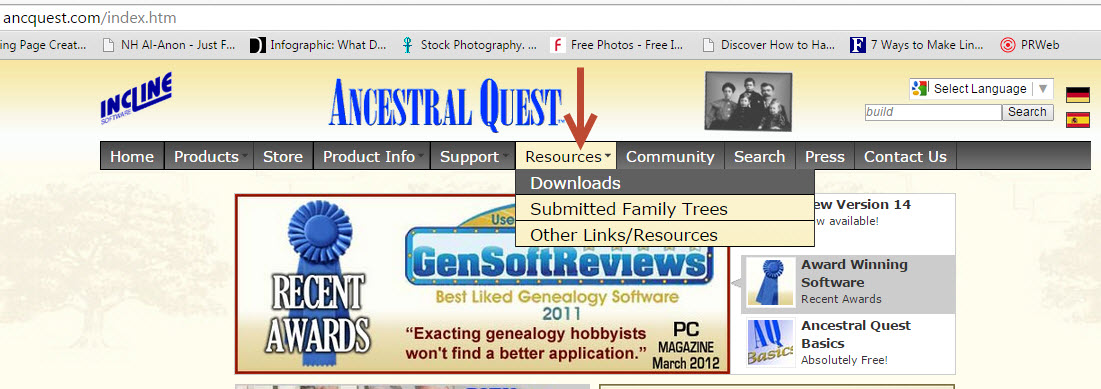
This takes you to our "Downloads" page, here you need to click on the section that says "Re-download your Ancestral Quest installer"

You are now at the Downloads Box where you click on AQ14 and are brought to the actual location of the download.

This last click takes you to the actual page to download the program. There are 3 choices:
1) The 'Streamlined Installer'
2) Collaboration Installer
3) Complete Installer (this includes the first 2 together but you still have to install them separately)
One the program has downloaded you have to double click it to Run although sometimes you are given the option to run it once the program has downloaded.
That's it! You've succeeded in installing the program on your new computer or laptop.
Remember Ancestral Quest is fully FamilySearch Certified!
Comments and questions are always welcome!
Happy Ancestraling...
Claire ;)
Facebook: https://www.facebook.com/AncQuest
Twitter: http://www.twitter.com/ancquest
YouTube: http://www.youtube.com/inclinesoftware
(c) 1994-2015 Incline Software, All Rights Reserved
gfindlay@ancquest.com
gfindlay@ancquest.com


