Showing posts with label Software Updates. Show all posts

Monday, February 1, 2016

Software Programs & Family/Data Files


Understanding how computers and software works can be a challenge for many people today. There are so many different kinds of computer terms that it gets confusing.

Sometimes individuals "avoid software updates" because they think it will affect their data, somehow the data files and the software are considered as one in their minds when in reality they are separate pieces of the way a computer program works.

While most understand the hardware is the device you are using, the software program actually tells the device what to do so you can proceed with what you are working on. Whether it is a letter, a spreadsheet or some other task, the software program allows you to accomplish it.

Looking at the picture above is a good way to think about your genealogical software program as well as all others. You purchase the software, download it and install it onto your digital device. Usually after installing your software it places an Icon on your desktop, for Ancestral Quest, it looks like this:


When you double click this Icon it will open up and walks you through setting up your family file/data. From this point on you continue to work with the program. While doing this, the file remains just a file that can only be used by your program.

When you receive notice of updates, they only affect the software and not the family/data files. Usually updates are there to improve the functioning of the software which is to your benefit.

If you change computers, you will have to move those family/data files and re-install the program onto the new computer in order to continue using it and growing your family tree. Using a flash or thumb drive to copy your files is the easiest way to do this this. Re-downloading the program can be done from the website here: Download Page.

Enjoy the program, remember to do the updates and watch your family tree grow!

Remember Ancestral Quest is fully FamilySearch Certified!


Comments and questions are always welcome!


Happy Ancestraling...Claire ;)


AQ Cues & Clues Blog:http://ancquest.blogspot.com/

(c) 1994-2016 Incline Software, All Rights Reserved
 gfindlay@ancquest.com


Friday, May 30, 2014

AQ: New Build: 20


All software needs to updated regularly these days and Ancestral Quest is no exception.

While PAF had a few updates, this will be the 20th update for Ancestral Quest since Version 14 came out in 2012.

Many times updates enhance the software and help it to run and work better as well as new features can be added. To see the list of changes from from this latest release, please click here.

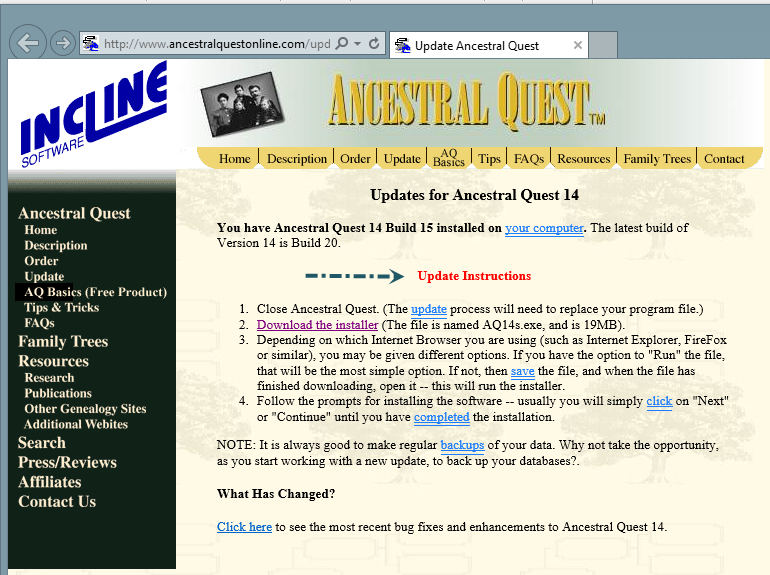
You may have noticed when you opened up your Ancestral Quest program today that there was an update and to click here, if you did it took you to this page:


When you clicked the "Get Update" it took you to this screen:


From this point you can follow the update instructions step by step, however if you need additional help, here are additional step by step directions if you missed the notice when you first opened up Ancestral Quest today.

Update Ancestral Quest to the Latest Build

Remember Ancestral Quest is fully FamilySearch Certified!


Comments and questions are always welcome!


Happy Ancestraling...

Claire ;)

AQ Cues & Clues Blog:http://ancquest.blogspot.com/

(c) 1994-2014 Incline Software, All Rights Reserved
 gfindlay@ancquest.com


Thursday, February 20, 2014

AQ: Noticing Updates...


      Most of us are creatures of habit and often use to doing things a certain way to the point that, when a new way to do something is introduced, often, it is ignored as long as possible until there is no choice but to adopt that new way into a new habit.

     There are always exceptions to this, when each of the new iPhones were released, many stood outside of stores waiting to be the first to own one as well as many other electronic products that have been introduced over the years.

     Regardless of how new a device or program is, updates are a necessary part of making sure it is always working properly and running correctly according to its design.

     Ancestral Quest is no different and so the programmers have created a way to alert you when updates are available for your program, however, many don't notice the alert and close it out only to call in because the program may not work they way it should.

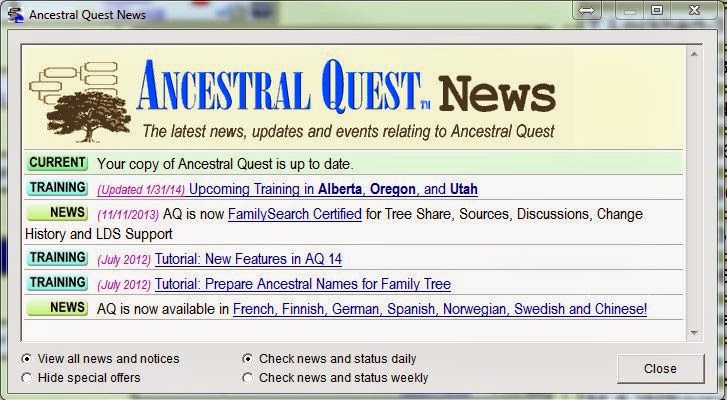
     When you first open Ancestral Quest, this is the screen you need to notice:


      Notice the first line in this box is CURRENT and is states my copy of Ancestral Quest is up to date. If your copy is not up to date it will tell you and provide a link to update. As there are many changes going on it is important to notice this when the program opens.

      If you missed this notice, you can also check by going to "Internet" and clicking on "Check for Latest AQ Release" as shown below:


     This click will take you to our website where it will check to make sure you have the latest update. If your program is updated it will tell you and if it is not, there will be a link to update it to the latest version.

     Ancestral Quest recommends you check on a regular basis to make sure you have the latest build by either noticing the notice or checking yourself as shown above. Staying updated allows your program to be the best it can be and continue to manage your genealogical database to your satisfaction.

     AQ has just released a tutorial to help with this process following it all the way to being installed on your computer, check it out here: http://ancquest.com/updatetutorial/index.htm!

Remember Ancestral Quest is fully FamilySearch Certified!


Comments and questions are always welcome!

Happy Ancestraling...
Claire ;)
AQ Cues & Clues
Blog: https://www.facebook.com/AncQuest
Facebook: https://www.facebook.com/AncQuest
Twitter: http://www.twitter.com/ancquest

YouTube: http://www.youtube.com/inclinesoftware

(c) 1994-2014 Incline Software, All Rights Reserved
 gfindlay@ancquest.com