Thursday, July 3, 2014

AQ: Add-on Products: GenSmarts


Are you trying to figure out the next place to search for your ancestors? Well GenSmarts can help you with that problem in a big way.

GenSmarts ia a genealogy software program that can analyze your family files and tell you person by person which record to search and why you should search that particular record. To help you even further, it will provide you with the location of the record, a film number if it is a film and the repository where that record is located, it really is an amazing add-on for anyone struggling with where to search next for their family lines.

GenSmarts will find the holes in your data and will do automatic lookups for you on free Internet websites. It works well with most versions of Ancestral Quest, Versions 3.0 through 14.

Their trial version never expires, however, the registered version has more features, more research sites and makes more recommendations and is available for only 24.95 (a one time purchase which includes free support and upgrades).

It is worth checking out their software and adding it to your arsenal of genealogical and family history tools!


For additional information, check their website out here. To order their product, click here.


Remember Ancestral Quest is fully FamilySearch Certified!


Comments and questions are always welcome!

Happy Ancestraling...

Claire ;)

AQ Cues & Clues Blog:http://ancquest.blogspot.com/

(c) 1994-2015 Incline Software, All Rights Reserved
 gfindlay@ancquest.com


Thursday, June 26, 2014

AQ: Add-On Products: AniMap 3.0.2


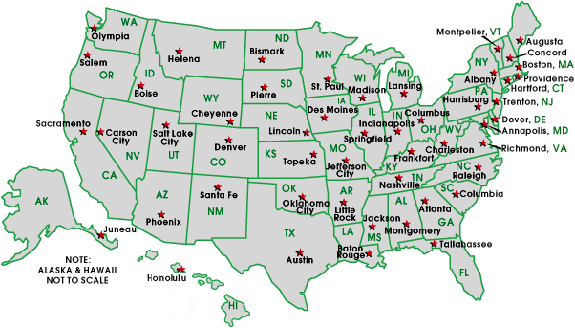
Map Coutesy of 50states.com

The second in our series of programs that work well with Ancesral Quest is AniMap 3.0.2 which is by The Goldbug.

Maps are critical tools for anyone researching their ancestors. AniMap shows an animated map of each of the 48 contiguous states. Each state map contains county boundary changes from colonial times to the present. 

One can use their SiteFinder to locate hundreds of thousands of cities, cemeteries or historical sites, then plot them on the appropriate state maps of AniMap.

One can also choose a year to see which county that site was located at that time. Once you know this you'll know the correct location for those county records or a repository to find information on your ancestor.

Their website, http://www.goldbug.com provides additional information along with two wonder videos to show how valuable this software is to your research. The first one is from GenealogyWise and the second one is a video showing how to export and locate images.


This product is completely compatible with Ancestral Quest.

To learn more about this product click here. To order this product click here. 

Remember Ancestral Quest is fully FamilySearch Certified!

Comments and questions are always welcome!

Happy Ancestraling...

Claire ;)

AQ Cues & Clues Blog:http://ancquest.blogspot.com/

(c) 1994-2014 Incline Software, All Rights Reserved
 gfindlay@ancquest.com


Thursday, June 19, 2014

AQ: Add-On Products: Charting Companion


Most genealogical programs have other software programs that work well with them to provide a customer something beneficial to them. Ancestral Quest has several products that work well with it to provide additional resources to its users.

While Ancestral Quest does have many charts to choose from within its own program, Charting Companion has additional charts not available through Ancestral Quest.


Supplementing your charting capabilities is a great idea. You can add Bow-Tie Charts, Hourglass Charts, Trellis Charts, Embroidery and more. Here is a link to samples of charts possible through Charting Companion.

This program is completely compatible with Ancestral Quest Versions 3.0 through 14. To learn more about this software click here.

Remember Ancestral Quest is fully FamilySearch Certified!


Comments and questions are always welcome!


Happy Ancestraling...

Claire ;)

AQ Cues & Clues Blog:http://ancquest.blogspot.com/

(c) 1994-2014 Incline Software, All Rights Reserved
 gfindlay@ancquest.com


Friday, June 13, 2014

AQ: News...Updates...Events


When it comes to finding out what the latest is concering Ancestral Quest, with just a few clicks one can easily discover all the happenings!

Once you have opened your AQ program go to Help and notice the drop down choices:


Click on Newsline which takes you to the screen which shows you all the news:


Notice that one can choose to view the news and notices, hide them, check the news daily or weekly.

By checking these radial bullets, one can keep up to date not only with the program updates but also learn about the latest trainings and other important news items.

Additionally, AQ now has a monthly newsletter that is emailed to everyone. The June issue just came out this week, if you missed it the link to it is here.

Remember Ancestral Quest is fully FamilySearch Certified!


Comments and questions are always welcome!


Happy Ancestraling...

Claire ;)

AQ Cues & Clues Blog:http://ancquest.blogspot.com/

(c) 1994-2014 Incline Software, All Rights Reserved
 gfindlay@ancquest.com


Monday, June 9, 2014

AQ: Adjusting Those Columns under Name List


Some things get confusing once in awhile and adjusting those columns under the Name List can be a little difficult if you are not used to manipulating items within Ancestral Quest.

The first step is to click on "Name List" and note the column headings and "Adjust Columns and Sorting":


One needs to click that button to open up the dialog box where you can adjust those column headings by removing, adding and re-ordering. Once clicked this is what it looks like:


General is usually where one will find the most used and requested columns so clicking that brings up a long list of possible column titles:


Notice there are 4 windows. The top left window has the available fields or "Column Headers", the section in the middle has 'greater than arrow' to move items from the right column to the left column and there is a 'less than arrow' that removes fields you don't want any longer.

Notice on the right side of the "Show Fields" the up and down bottons:


The highlighted item is also displayed in the bottom right where you are told how it will be sorted. The arrows give you the opportunity to re-order the way they appear in your family file. Once done you click OK. If you are satisfied than you are all set, if not, go back and re-order as you wish.

After working on my own name list, I came up with these as the column titles:


Remember Ancestral Quest is fully FamilySearch Certified!


Comments and questions are always welcome!


Happy Ancestraling...

Claire ;)

AQ Cues & Clues Blog:http://ancquest.blogspot.com/

(c) 1994-2014 Incline Software, All Rights Reserved
 gfindlay@ancquest.com


Friday, May 30, 2014

AQ: New Build: 20


All software needs to updated regularly these days and Ancestral Quest is no exception.

While PAF had a few updates, this will be the 20th update for Ancestral Quest since Version 14 came out in 2012.

Many times updates enhance the software and help it to run and work better as well as new features can be added. To see the list of changes from from this latest release, please click here.

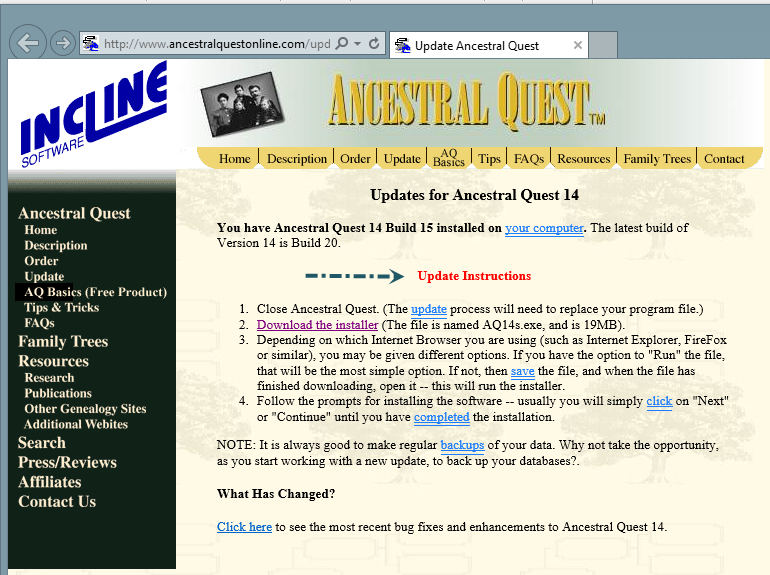
You may have noticed when you opened up your Ancestral Quest program today that there was an update and to click here, if you did it took you to this page:


When you clicked the "Get Update" it took you to this screen:


From this point you can follow the update instructions step by step, however if you need additional help, here are additional step by step directions if you missed the notice when you first opened up Ancestral Quest today.

Update Ancestral Quest to the Latest Build

Remember Ancestral Quest is fully FamilySearch Certified!


Comments and questions are always welcome!


Happy Ancestraling...

Claire ;)

AQ Cues & Clues Blog:http://ancquest.blogspot.com/

(c) 1994-2014 Incline Software, All Rights Reserved
 gfindlay@ancquest.com


Friday, May 23, 2014

AQ: Collaboration


Genealogy and/or Family History research can be demanding and frustrating to the point that the help of another family member is advantageous.

Collaboration in Ancestral Quest allows one to share their family file with another person through a log in and a password. AQ has a unique feature that allows you to work with other family members on a single collaborative family file. Each collaborator takes a turn to check out and edit the file. Changes that are made by one collaborator can be seen by the other collaborators after the file has been checked in.


To set up Collaboration, one needs to be a Registered Owner and create an account by going to "Collaboration" and click on "Sign-up" which looks like this:


Following the prompts brings you through the steps as an adminstrator and owner of the file. Once that is set up, one  "Publishes" their family file to our central server by clicking on Collaboration and scrolling down to "Publish Current File" which takes a few minutes. 

To work with a Collaboration File, one uses a proper log in and checks out their file by going to "Collaboration" and scrolling down click on "Check out file". 


While this file is on your own computer, no one else can access that same master file, take time to do your research, changes, etc. that normally happens when working on your family file. If another family member you have given access to needs to look at the file, they can download a 'working copy' which allows them to print reports and look at the data but they can not make any changes to the file. 

When done, click Collaborate and Check In File, you can also set it up that when you close your program it automatically will check the file in.

This whole process provides a way to have ones files on another server (as a backup) and allows one to work with others once access has been set up for them. Here are some links that go into more detail:
The author has used collaboration for years and has found it to be most helpful as there is access from any location as long as there is Internet service. 


Remember Ancestral Quest is fully FamilySearch Certified!


Comments and questions are always welcome!


Happy Ancestraling...

Claire ;)

AQ Cues & Clues Blog:http://ancquest.blogspot.com/

(c) 1994-2014 Incline Software, All Rights Reserved
 gfindlay@ancquest.com