Friday, June 5, 2015

New Computer? How to Re-Download Ancestral Quest


Computers often need replacing when we least expect it and then it can be a panic to get everything off the one that is going or gone and transferring everything to the new computer.

All this can be difficult and unsettling for many, especially when they finally get home with their data and no programs.

Most places will copy your data but you still have to re-install the program. Family History/Genealogy is one of those types of programs most places will want you to re-install yourself, so how do you do that? Do you have to get a new registration key? 

1) You don't need to purchase another key, you can email us and we will send it to you. 

2) To re-install the latest version of the program go to our website at http://www.ancquest.com and click on "Resources" and then "Downloads" in the drop down.
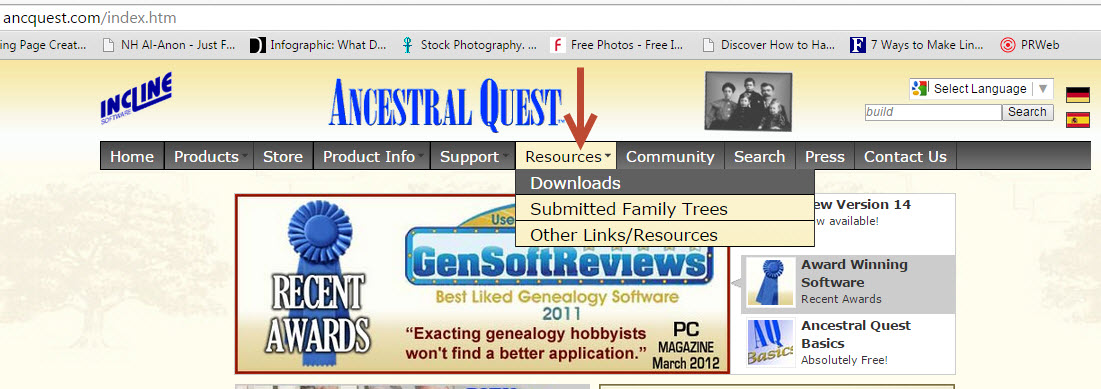


This takes you to our "Downloads" page, here you need to click on the section that says "Re-download your Ancestral Quest installer"


You are now at the Downloads Box where you click on AQ14 and are brought to the actual location of the download.


This last click takes you to the actual page to download the program. There are 3 choices:

1) The 'Streamlined Installer'
2) Collaboration Installer
3) Complete Installer (this includes the first 2 together but you still have to           install them separately)

One the program has downloaded you have to double click it to Run although sometimes you are given the option to run it once the program has downloaded.

That's it! You've succeeded in installing the program on your new computer or laptop.

Remember Ancestral Quest is fully FamilySearch Certified!


Comments and questions are always welcome!


Happy Ancestraling...

Claire ;)

AQ Cues & Clues Blog:http://ancquest.blogspot.com/

(c) 1994-2015 Incline Software, All Rights Reserved
 gfindlay@ancquest.com


Friday, May 29, 2015

Direct Research Links

While Ancestral Quest is a place to enter your ancestral information, it also has tools to help you research those ancestors in order to add new generations and fill in family information.

Looking in my files I'd like to learn more information on Charles Brisson, born in 1670 in Chateau Richer, Montreal, Quebec, Canada. I've highlight him and clicked on the drop down "Internet" as follows:


One can choose from this point to search Ancestry.com, FamilySearch.org, WorldVitalRecords.com or go to my own list of "Favorite Sites" and see the results of my search. In reality, one needs to check each one out to see what information is available and what documentation is there to back up that information.

If one clicks the "Search Favorite Sites.." it brings up all the sites entered for researching:


Clicking on 'Perform Internet Search', takes the search of the highlighted person to that site. Checking Ancestry didn't provide much, but WorldConnect, FamilySearch and World Vital Records returned some possible connections:


Details (Sources) were provided with the FamilySearch entry and clicking the section from World Vital Records which is now owned by MyHeritage required a subscription, however, if you are in a Family History Center that is available for free.

The World Connect's response was from RootsWeb which also offered additional information on this family:


Additional searchable websites can be added to the 'Favorites' and this research tool can be used to help extend your ancestral lines and fill in missing family members.

Remember Ancestral Quest is fully FamilySearch Certified!


Comments and questions are always welcome!


Happy Ancestraling...

Claire ;)

AQ Cues & Clues Blog:http://ancquest.blogspot.com/

(c) 1994-2015 Incline Software, All Rights Reserved
 gfindlay@ancquest.com
Friday, May 15, 2015

AQ Newsletters


Ancestral Quest has a monthly newsletter that you should be receiving by email. 

We've had a newsletter since March, 2014 that is packed with ideas, tips, the latest updates, what's coming and information on ways to use different features. It is worth your time to review these each month. Here is the front of the newsletter:


If you are missing any of the newsletters, they are now available here: Newsletter Archives.

Additionally, we are on Facebook for those who are into Social Media, you can post questions, share ideas and success stories for others to read. Here is the link to our Facebook page: https://www.facebook.com/AncQuest

We also post tips and lots of inspirational and funny comments regarding genealogy and family history! For instance, our post today looks like this:


Learning about all the great features in Ancestral Quest will definitely help improve your research skills and in locating those elusive ancestors!

Remember Ancestral Quest is fully FamilySearch Certified!


Comments and questions are always welcome!


Happy Ancestraling...

Claire ;)

AQ Cues & Clues Blog:http://ancquest.blogspot.com/

(c) 1994-2015 Incline Software, All Rights Reserved
 gfindlay@ancquest.com


Thursday, May 7, 2015

Setting the Home Person

Ever want to change the "Home" person in your Family File? This is not a difficult thing to do and is accomplished with a few clicks in Ancestral Quest.

First you determine who you want in the #1 position, it doesn't matter what their RIN number is to be there, just write that number down or remember it.

Go to "Tools" and scroll down to "Preferences" like this:


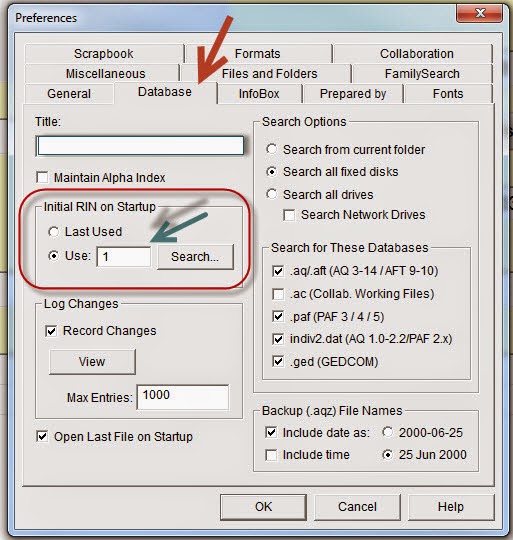
Once you have clicked on the "Preferences" you'll need to go to the "Database Tab", note that the default tab is "General" so when you open preferences it will go to the General Tab.


We have circled the area where you put the RIN number of the person you want in that "Home" position. Once you enter that number, click on "OK".

That's it, now that person will be in the main position when you click on the "Home" Icon at the top of the program.


As long as you use the Icon you'll be able to get to the 'Home' person in the Pedigree or the Family View.

Remember Ancestral Quest is fully FamilySearch Certified!


Comments and questions are always welcome!


Happy Ancestraling...

Claire ;)

AQ Cues & Clues Blog:http://ancquest.blogspot.com/

(c) 1994-2015 Incline Software, All Rights Reserved
 gfindlay@ancquest.com


Tuesday, April 7, 2015

Help: Just a Keystroke Away!


Ancestral Quest has help files throughout its whole program just a click away, however, like most of us we sometimes don't notice that Help is there.

By clicking "F1" or on the word "Help", it takes you to the additional assistance you may need on that particular screen or that particular part of the application. Here are a couple of examples:

1) The Edit Individual Screen:


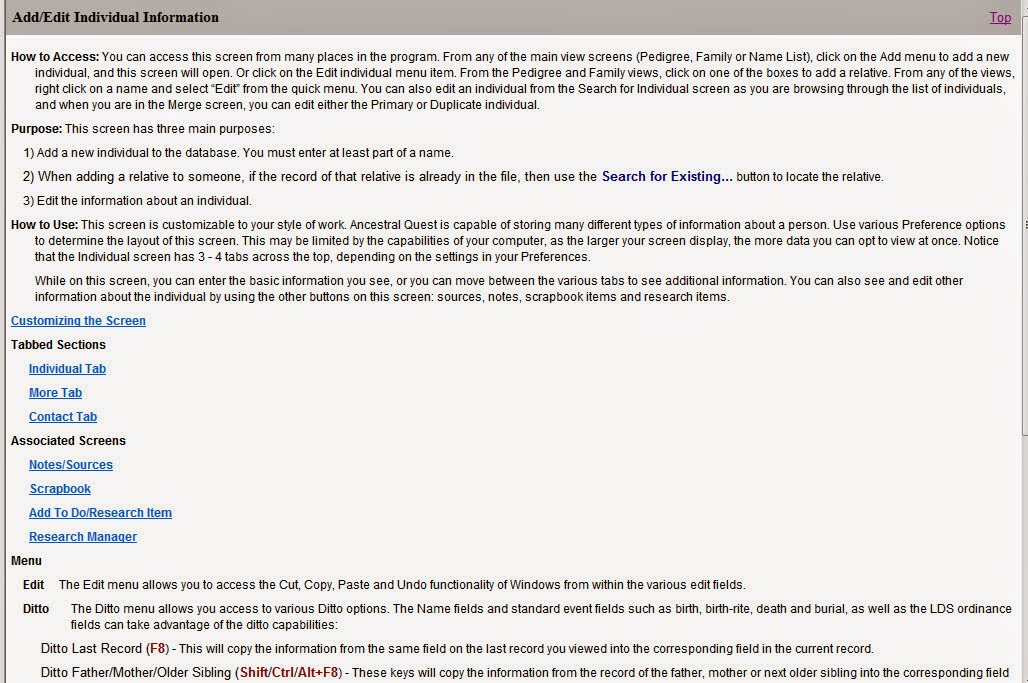
Once you click this Help feature the additional information displays on your screen:

Edit Individual Instructions:


Once in this Help screen, every part of the original screen you were in is explained in greater detail making it easier for you to work on that screen.

A screen that can be overwhelming is the Reports and Charts menu. There are many tabs one can click on, which ever tab is active is where the Help will take you.

2) Reports and Charts Screen:


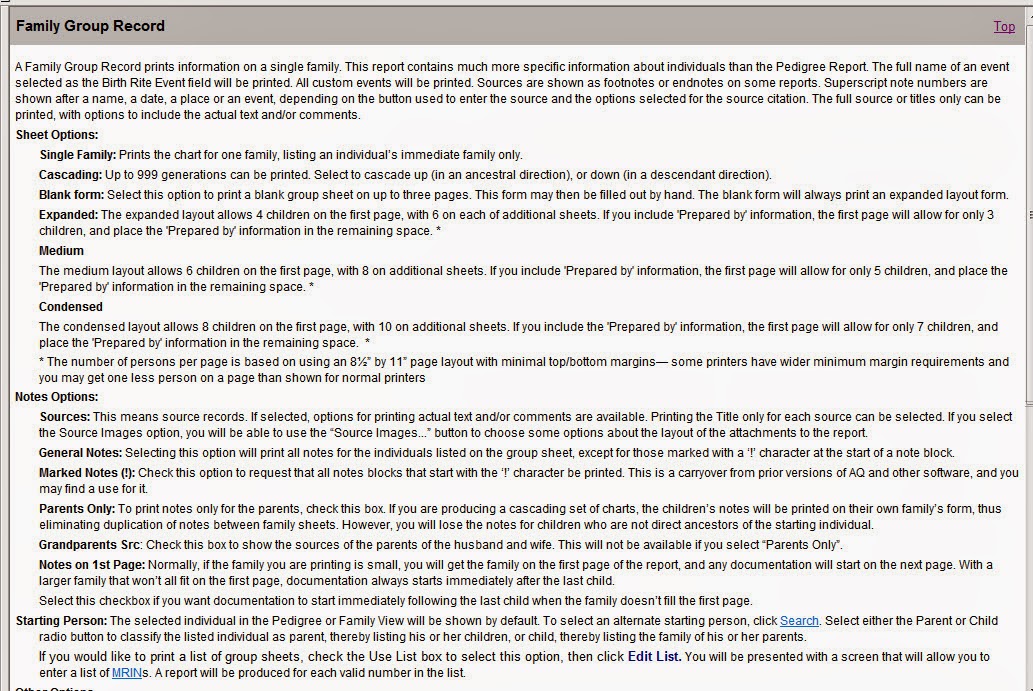
Note that the Family Group tab is active so when click "Help" the results is additional helps and information on how to best use this feature:

Family Group Record Instructions:


Sometimes all we need is a little future explanation of a particular feature to continue on and successfully use it. 

These "Help" features are throughout the whole program, however, if you want to just use a keystroke, use "F1" and it will get you there also.

One should take a moment to review "Help" whenever further clarification is needed and become more confident as a user!

Remember Ancestral Quest is fully FamilySearch Certified!


Comments and questions are always welcome!


Happy Ancestraling...

Claire ;)

AQ Cues & Clues Blog:http://ancquest.blogspot.com/

(c) 1994-2015 Incline Software, All Rights Reserved
 gfindlay@ancquest.com

Monday, February 9, 2015

Upgrading to the Next Build..


Updating Ancestral Quest to the Latest Build

Open up your own Ancestral Quest program to do a build update.
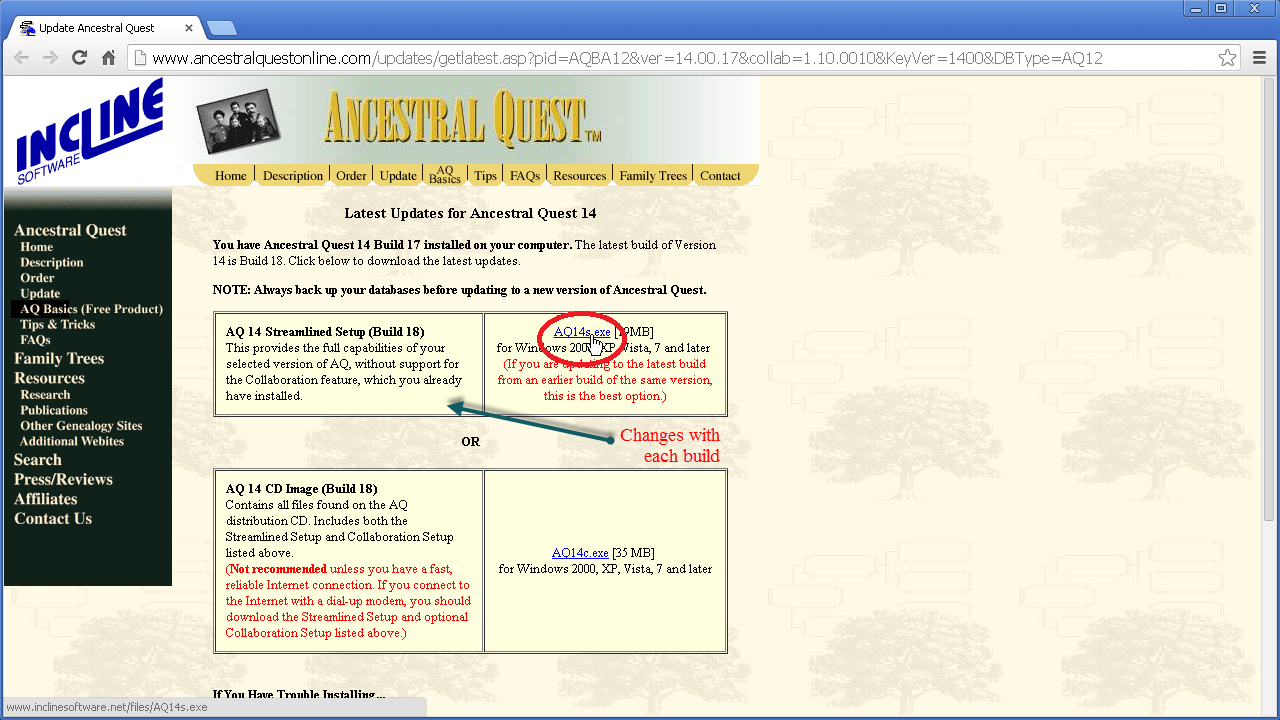
The first thing one needs to do is to check to see if there is an update for you. Go to the Internet menu located at the top of the screen, and click on Check for Latest AQ Release. This will bring you to the Ancestral Quest website.


Once the website comes up, it will tell you one of two things:
1) Your copy of Ancestral Quest is up to date
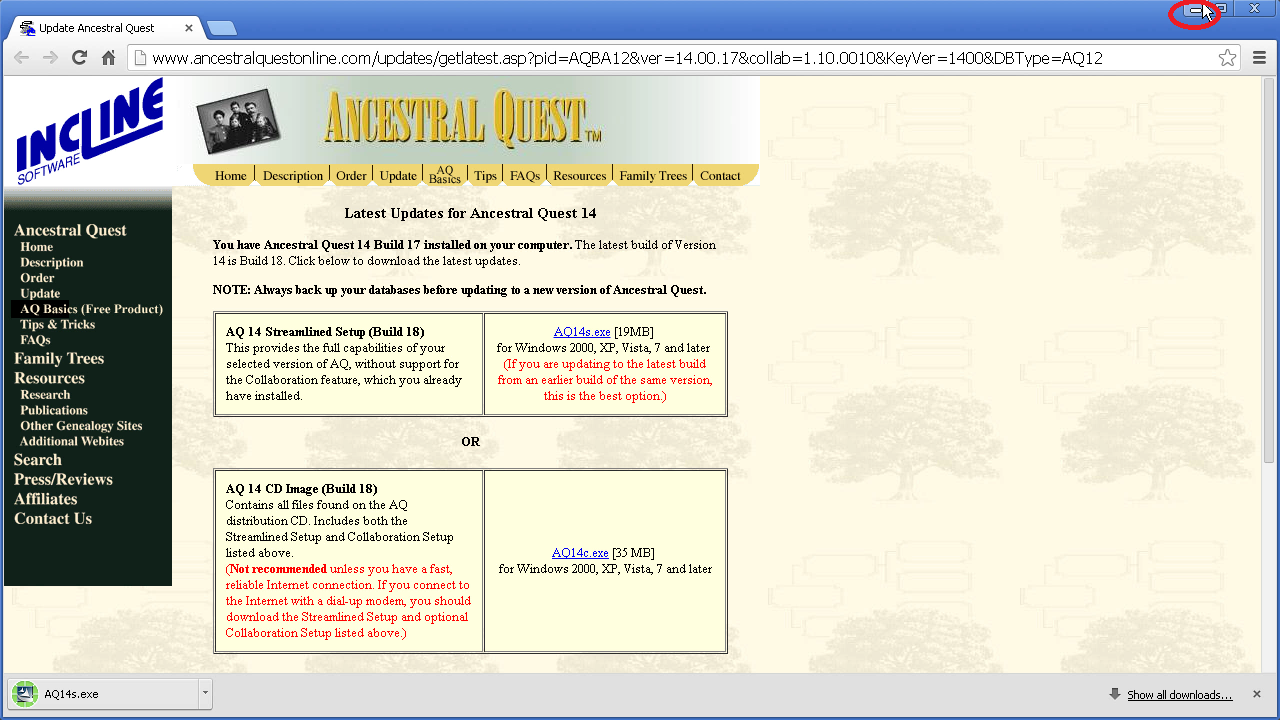
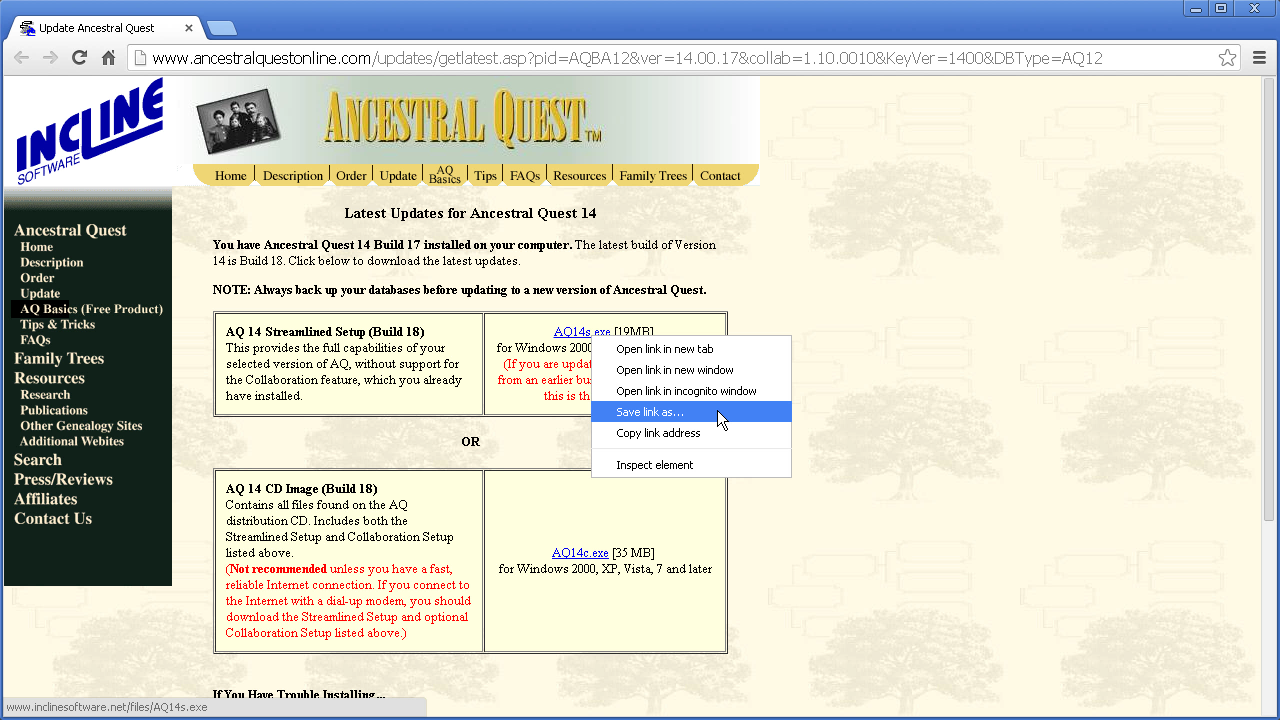
2) Your program needs to be updated. If this is the case, then right-click on AQ14s.exe.


In the right click menu, select Save link as..for Mozilla Firefox or Google Chrome. For Internet Explore, Select Save Target as...


In the Save As menu, select the Desktop as you download destination. This is to make sure you are able to easily find the installer in just a short time.


Minimize your Internet browser to get it out of the way. You can do this by clicking on the minimize button which is located in the upper right-hand corner of your screen. It's the minus button that is just to the left of the X.


Close Ancestral Quest by clicking on the X in the upper right-hand corner of your screen. We need to do this because the installer is not able to run properly if Ancestral Quest is open.

Now you are ready to install the update. On your Desktop, double click on the AQ14s icon, which will begin the installation setup.


To follow the rest of the steps please click here.

Remember Ancestral Quest is fully FamilySearch Certified!


Comments and questions are always welcome!


Happy Ancestraling...

Claire ;)

AQ Cues & Clues Blog:http://ancquest.blogspot.com/

(c) 1994-2015 Incline Software, All Rights Reserved
 gfindlay@ancquest.com

Monday, January 5, 2015

Decisions on Upgrading..


You have AQ 12.1 or earlier and have been postponing upgrading as you are happy with your current software. 

Sometimes you think that, if it is working OK, why should I upgrade to a newer version?

The answer is simple, you are not taking advantage of all the latest features that have been added to make Ancestral Quest a better product for you while giving you many new features to make your family history that much better. 

Ancestral Quest 14 has been a major upgrade from 12.1 and earlier versions. It offers many of the highly anticipated new features: 

1) The Research Timeline
2) Color Coding
3) Tags
4) New Fan Colorful Fan Charts
5) Many new enhancements with FamilySearch Family Tree

To learn more about these features check out our webpage here.

Many additional features have been added to the above list since this release in June, 2012. There have been 22 updates since that time to the present.

Take advantage of upgrading for just 19.95 with a download at the AQ Store and enjoy all the new features for the new year! 

Remember there is online and on the phone support for AQ, our Blog and Facebook page where one can learn more about Ancestral Quest. For those interested, AQ also has 2 Yahoo groups who help each other out. To learn about them click here for general program helps and here for program helps connected with FamilySearch Family Tree.

Start of the New Year and upgrade to Version 14!

Remember Ancestral Quest is fully FamilySearch Certified!


Comments and questions are always welcome!


Happy Ancestraling...

Claire ;)

AQ Cues & Clues Blog:http://ancquest.blogspot.com/