Showing posts with label AncestralQuest. Show all posts

Monday, December 6, 2021

AQ-Illegitimate Ancestors


    Researching ones' ancestors can be a frustrating, yet, enjoyable task. For many it is a labor of love, especially adding names to ones' tree, especially those more difficult to find. The fact that searching for ancestors is one of the most reasons individuals search the internet speaks volumes for the gratification received by an ancestral seeker.

    Unfortunately, people a human and sometimes one can run into a family member who was illegitimate. This happened when researching a line a the Family History Library back in the 1990s when this author came across a birth entry with the words "Illigitimate" written accross the entry.


Image curtesy of Scotland Peoples
     
    While it was a bit of a surprise, there was additional information in the record to assist in locating the father. Under father, the name had been entered but it was crossed out. In spite of this one could read the entry.


Image curtesy of Scotland Peoples

    Some may say it is only circumstantial evidence, however, the census record listed the mother as a cook in this person's business as a surgeon. The responsibility of taking care of this child fell to the mother as the father ended up joining the military as a doctor (surgeon) and died in Pietermaritzburgh, Natal, South Africa. It was not uncommon to deny culpability, however, the father's will even says nothing about the child he abandoned. His mother made sure he had a good home and was raised well. Life happens, so one does the best they can at the time.  

    He knew who is father was as he is listed in his marriage record, however, not much else is known about what happened to his own mother after she gave her son to her aunt and husband to raise. The mother gave the son the fathers' last name as part of his name to make sure he knew the name of his father. While these things are frustrating and sometimes the fathers' name is blank, it is possible to find out the missing parents' name with a lot of diligent research. Using the hints in Ancestral Quest can aid any research query, be sure to take advantage of it. 

Remember Ancestral Quest is FamilySearch Compatible!


Happy Ancestraling...Claire 


(c) 1994-2021 Incline Software, All Rights Reserved

ancquest@ancquest.com

Comments Welcomed!


Thursday, March 9, 2017

TreeTips


As family history/ancestral researchers, it is always a good thing to get extra help in locating one's ancestors. TreeTips, does just this, it helps you research and locate records and family trees from the information in your own data files.

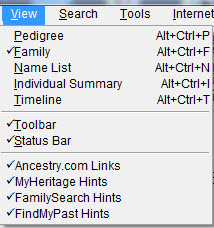
In partnership with MyHeritage, FamilySearch and Findmypast, Ancestral Quest provides TreeTips in your own datafile. As you enter in the information you know about an ancestor, AQ will use the combined hints of these three web-based companies to search over 12 billion records for additional information to help grow your tree or to provide you with missing sources from known but not proven information.

To make sure these are activated, go to the View in the AQ program menu and make sure the hints are all checked.


The above action will put additional Icons showing there are hints on the individuals in your tree. It looks like this:


Note that for this individual, there are hints from Findmypast, FamilySearch and MyHeritage. Hovering on each Icon shows you how many hints there are for you and clicking the Icon takes you right to the hints.


This is the actual 1920 US Census for Joseph Brisson and his family. I can easily attach it to my records as a source if I need to. Additionally, I'll be able to confirm or deny this is a good hint. 

Each Icon does the same, it brings you to records and/or trees from the above sites. This is one of the new features in Ancestral Quest 15, this author has found some new discoveries using this feature and is looking forward to possibly breaking through some brick walls and also adding some additional missing sources using TreeTips.

Take advantage of all the new features in Ancestral Quest 15 today!


Remember Ancestral Quest is fully FamilySearch Certified!


Comments and questions are always welcome!


Happy Ancestraling...Claire ;)


AQ Cues & Clues Blog:http://ancquest.blogspot.com/

(c) 1994-2017 Incline Software, All Rights Reserved
 gfindlay@ancquest.com


Monday, June 6, 2016

Fixing Quick Entry Place List


Sometimes we enter the wrong spelling for a location and then with Quick Entry turned on it\s difficult to get past it.

When using Quick Entry it makes it quicker to enter information into your database/family file, however, when the place is spelled wrong the error keeps happening.

To fix an entry in Quick Entry, go to Edit and click on Quick Entry Place List.


In the box that opens up, locate the place you need to edit by using the scroll bar on the right if necessary and selecting it.


Click on the "Edit" button and the highlighted area is brought down into the bottom area where you can make your changes. Once those changes are made you'll want to "Save" the change. Next click on the "Close" button to close this out. From this point on you'll have the correct entry for that location. This process can be repeated as many times as necessary.

Enjoy this and many other features in Ancestral Quest.

Remember Ancestral Quest is fully FamilySearch Certified!


Comments and questions are always welcome!


Happy Ancestraling...Claire ;)


AQ Cues & Clues Blog:http://ancquest.blogspot.com/

(c) 1994-2016 Incline Software, All Rights Reserved
 gfindlay@ancquest.com

Monday, February 8, 2016

Setting Parent/Child Relationships


In our day to day life, relationships can change in a moment. Setting the relationships between parents and spouses is easily done in Ancestral Quest.

The first one to discuss in the parent/child relationship. Ancestral Quest allows you to set that to one of the following:
  • Biological
  • Adopted
  • Step
  • Foster
  • Guardian
  • Sealing

To do this, put the child in the main position in the Family View and click on the "Other Parents/Rels" button to the right of that child as shown below:


When you click the button, use the drop down arrow to expand the selections and choose the correct one for each parent:


Once the relationship has been set, click on OK and you are set for that child. If there are more children then repeat the steps till all the children's relationships involved have been labeled correctly.

That is how simple it is to set the correct relationships!

Remember Ancestral Quest is fully FamilySearch Certified!


Comments and questions are always welcome!


Happy Ancestraling...Claire ;)


AQ Cues & Clues Blog:http://ancquest.blogspot.com/

(c) 1994-2016 Incline Software, All Rights Reserved
 gfindlay@ancquest.com


Monday, December 7, 2015

AQ Addon Products: Heritage Collector Suite


Ancestral Quest works well with the Heritage Collector Suite as it allows you to organize, find, share and preserve all your family history photos, files and documents and create multiple items to share with family.

According to their website, it is a complete photo mangement system that allows you to create the following:

Family Calendars
Make Storybooks
Family Videos
Label Scanned Photos
Organize Photos into collections
Family Newsletters
Create Slideshows
Create Interactive Stories

You are also able to run Heritage Collector on an Eternal Hard drive. This becomes handy when taking family trips or visiting family and friends. 

A Digital Manual comes with this program and designed for Normal People. The guide has:

Step-by-Step instructions
Screen captures to make it simple to follow
No computer language
Full color 
Downloadable PDF version

Drag and Drop photos to and from FamilySearch, Facebook and Pintrest into Heritage Collector Collections. 

Included are Free Webinars to help anyone at any level of expertise. Learn at your own pace when its convenient for you.

Special Introductory price includes $20 off through Ancestral Quest for $79.95.

This would make a great gift for Christmas along with Ancestral Quest!


Remember Ancestral Quest is fully FamilySearch Certified!


Comments and questions are always welcome!


Happy Ancestraling...Claire ;)


AQ Cues & Clues Blog:http://ancquest.blogspot.com/

(c) 1994-2015 Incline Software, All Rights Reserved
 gfindlay@ancquest.com

Friday, October 16, 2015

Turning On FamilySearch-Family Tree Connection


When you first download Ancestral Quest the connection to FamilySearch Family Tree is not turned on. To turn them on follow these steps:

Go to Tools and then Preferences:


On the "General" tab that appears, look to the upper-right area of the window, the following options should have a check mark:

Connect with FamilySearch


Place a check mark in the box and click OK to save the changes. Now the ability to link and sync with Family Search has been enabled. 

When viewing your database you will see a tree at the end of the name which is clickable into the FamilySearch Family Tree database.  You will have to have a FamilySearch account, it is not necessary to be a member of the LDS church to have an account and there is no cost.


Once your individual is linked, the tree changes to a blue tree instead of a clear tree.

Using FamilySearch.org to aid your research can help with locating new family members. This feature can aid you in growing your family tree.


Remember Ancestral Quest is fully FamilySearch Certified!


Comments and questions are always welcome!


Happy Ancestraling...Claire ;)

AQ Cues & Clues Blog:http://ancquest.blogspot.com/

(c) 1994-2015 Incline Software, All Rights Reserved
 gfindlay@ancquest.com


Friday, September 4, 2015

Moved? Changing the 'Prepared by' in AQ


Most individuals at some point in their life has had to move, The process of packing up all of one's belongings, putting them on a truck of some sort and then traveling to a new home can be overwhelming and seemingly impossible and never ending.

Once you reach your new location, the unpacking begins and eventually things begin to settle down to some sort of normalicy. This whole process can take months or weeks depending on the time schedule involved.

Eventually, notices have to sent out to various places to inform them of the new address, family and friends are also notified. 

One of the places that can easily can skipped in updating an address is your Ancestral Quest Family File. It isn't something you think about or even worry about until one day the opportunity to share a Family Group Sheet or a Pedigree comes along. It is printed and there is the old address.

To fix this, simply go into Tools and scroll down to 'Preferences', like this:


Once there you'll need to click on the "Prepared by" tab:


Simply remove the old address and type in the new one and click on "OK". That is all there is to updating the program with your new address!

Remember Ancestral Quest is fully FamilySearch Certified!


Comments and questions are always welcome!


Happy Ancestraling...

Claire ;)

AQ Cues & Clues Blog:http://ancquest.blogspot.com/

(c) 1994-2015 Incline Software, All Rights Reserved
 gfindlay@ancquest.com


Friday, June 12, 2015

Setting those Relationships..


Do you struggle trying to figure out how person no. 452 is related to you?

Often it happens that you discover a new individual and are curious as to their exact relationship or one is just curious.

Ancestral Quest allows you to set your relationship to whomever you wish in your family database file.

This is done by highlighting the individual you want to set the relationship to and then going to "Tools" and scroll down and click on "Relationship Indicators":


If the root person is not the person you want, click on the 'Search' button to locate the correct person which would be the highlighted individual, put their number in the box and click OK and then click OK one more time. 


When you click that second 'OK', the programs goes through your whole family database file and re-sets the relationships to that person, the message you receive looks like this:


Click that last 'OK' and the relationships have now been set to that individual. To view them, put your file in the 'Family' view by clicking on the 'Family' tab. The relationships show above the individuals as such:


This can be done with anyone in your family database file and show just how you are related to that expected visitor!

Remember Ancestral Quest is fully FamilySearch Certified!


Comments and questions are always welcome!


Happy Ancestraling...

Claire ;)

AQ Cues & Clues Blog:http://ancquest.blogspot.com/

(c) 1994-2015 Incline Software, All Rights Reserved
 gfindlay@ancquest.com


Friday, May 29, 2015

Direct Research Links

While Ancestral Quest is a place to enter your ancestral information, it also has tools to help you research those ancestors in order to add new generations and fill in family information.

Looking in my files I'd like to learn more information on Charles Brisson, born in 1670 in Chateau Richer, Montreal, Quebec, Canada. I've highlight him and clicked on the drop down "Internet" as follows:


One can choose from this point to search Ancestry.com, FamilySearch.org, WorldVitalRecords.com or go to my own list of "Favorite Sites" and see the results of my search. In reality, one needs to check each one out to see what information is available and what documentation is there to back up that information.

If one clicks the "Search Favorite Sites.." it brings up all the sites entered for researching:


Clicking on 'Perform Internet Search', takes the search of the highlighted person to that site. Checking Ancestry didn't provide much, but WorldConnect, FamilySearch and World Vital Records returned some possible connections:


Details (Sources) were provided with the FamilySearch entry and clicking the section from World Vital Records which is now owned by MyHeritage required a subscription, however, if you are in a Family History Center that is available for free.

The World Connect's response was from RootsWeb which also offered additional information on this family:


Additional searchable websites can be added to the 'Favorites' and this research tool can be used to help extend your ancestral lines and fill in missing family members.

Remember Ancestral Quest is fully FamilySearch Certified!


Comments and questions are always welcome!


Happy Ancestraling...

Claire ;)

AQ Cues & Clues Blog:http://ancquest.blogspot.com/

(c) 1994-2015 Incline Software, All Rights Reserved
 gfindlay@ancquest.com